

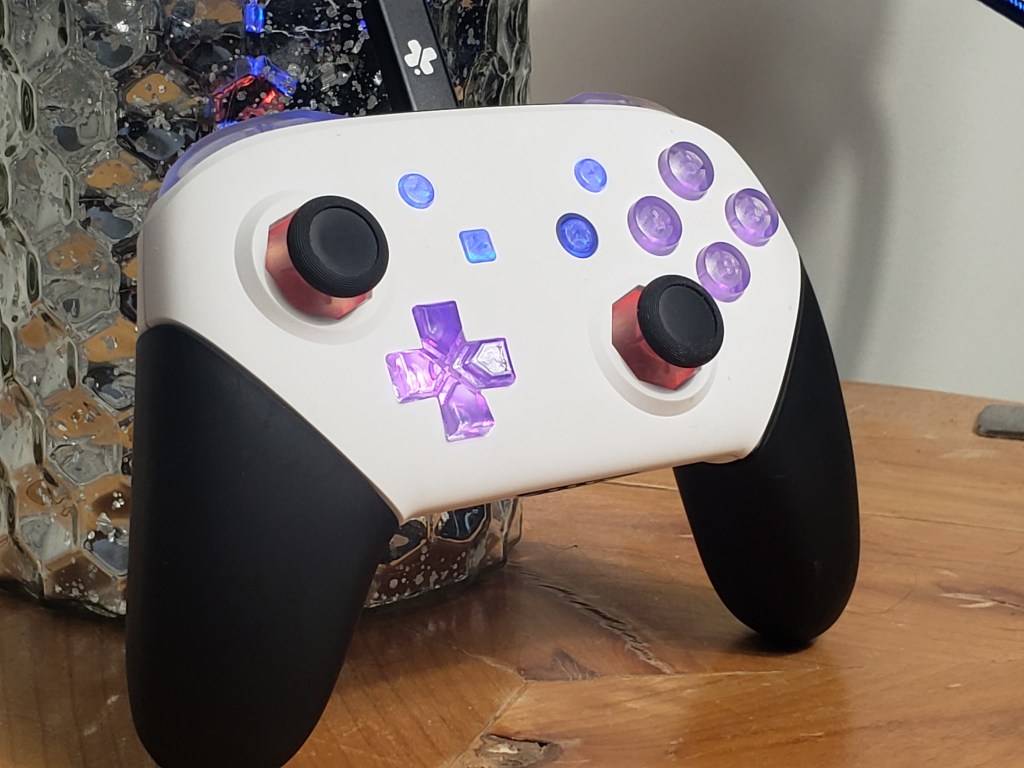
I have gone through multiple Pro Controllers as a result of my gaming. Competitive Smash is one of the most intense ways one can play video games and Pro Controllers are just fragile enough that I felt like I constantly had to replace my controller. One of the primary ways that these controllers breaks is with their stick boxes. Stick Drift is a frighteningly common issue and makes it so even if you aren’t touching the controller it thinks you are holding the stick in a direction. Obviously this is a massive issue in competitive gaming as any interference with your stick movement could be the difference between a won or lost game. It’s wireless nature can also suffer from interference when you travel to tournaments where hundreds of other people are using the same controller.
A common alternative controller choice for competitive Smash Bros players would be the Gamecube controller. This is a great controller in many ways. It’s simple design lends durability to it in a way that the Pro Controller simply can’t compete with. While I have switched to a Gamecube Controller when my Pro Controller is broken it’s not a perfect solution either. While the Gamecube Controller has an iconic layout, it’s design is not the most ergonomic and I find my hands and wrists hurt far more after playing on it compared to the more standardized design of the Pro Controller. And unless you’re using a bulky Wavebird Gamecube Controller, there’s no option for wireless play.

When I decided that I was going to Supernova, the largest Smash Bros tournament of the year, I knew that I would need to find a controller for the event. But I had a unique issue. I wanted to compete in every single Smash game while I was there. From Super Smash Bros on the Nintendo 64 all the way to Ultimate on the Nintendo Switch. If I wanted to do this challenge using official Nintendo controllers I’d need at least two-three different controllers for the event. I would want to play on a Pro Controller for Ultimate since that is my preferred controller. I could use a Gamecube controller for Melee, Brawl, and Smash 4. But I’d have to purchase a Nintendo 64 controller, something I haven’t played on since I was a small child, in order to play the first Smash Bros game. But what if I told you there was not only a way to play all five games on my preferred style of controller, but it also came with a ton of modifications to it that makes it the ideal competitive controller for competitive play?
ProGCC Features
- USB-C Cable adapter for every Nintendo Console
- Ability to emulate multiple styles of controller including Nintendo and XBox
- Hall-Effect sensors to ensure against stick drift
- Anti-Snapback Technology
- Tournament mode disabling the D-Pad and menu buttons
- Customizable LED Lighting
- GUI to modify the controller to your preferences
- Wired or wireless play

I reached out to Handheld Legends, a company that specializes in video game accessories including the ProGCC, which is a modified Nintendo Switch Pro controller that is loaded with features designed for competitive play. The main feature I was interested in for this event was the ability to swap out the USB-C cable adapter to fit whatever port I needed it to. If I wanted to play on the Nintendo 64 using a modern controller such as an XBox or a Playstation controller there is simply no way to purchase an adapter for this and would need to create one on my own. But with the ProGCC, all I need to do is simply swap out my USB-C cable to match whatever console I am playing on. Thanks to Handheld Legends I now had one controller that could play on every single Nintendo console from the Switch all the way back to the Nintendo Entertainment System that came out over 40 years ago.

But the ability to switch out cables isn’t the only feature that came with this controller. By creating their own custom motherboard for the Pro Controller they are now able to update it with brand new features that aren’t possible on a standard Nintendo Pro Controller. The way this controller works is by emulating whatever controller you have it set to. By emulating the controller you are then able to modify different aspects of the controller which you can do through a simple and easy to use GUI. Something that many professional Melee players have been experimenting with is to set their Z-Trigger to jump instead of grab. To do this on original hardware you have to pay a controller modder to physically rewire the controller. In Smash Bros Ultimate I have my right shoulder button set to jump in the controls, and having the ability to do the same thing in Melee by simply clicking on an option in a menu is so much easier than the alternative. This was huge for me during the tournament and it felt much more natural for me to play multiple games as a result.
Handheld Legends also offers stick replacements that come with hall-effect sensors. By utilizing magnets instead of moving parts, hall-effect sensors are capable of sensing your sticks movement while being far less susceptible to hardware failure. With a little bit of coding other hardware limitations such as snap-back, an issue where your stick will snap to the other side when released to neutral creating an unintended input in the opposite direction, can easily be fixed. And through the GUI you can even further customize the controller by changing the LED lights and modify the deadzones to your tastes as a player.

There are even features that you can use during tournament games. By pressing the sync button on the back of the controller the LED’s will flash green signaling to the player that the controller is in tournament mode. This disables buttons that could interfere with serious gameplay such as the pause button and taunts. To turn these buttons back on simply press the sync button again and it will glow red briefly. Something else that sets this apart from Pro Controllers is the ability to turn the controller off. Such a simple feature is not available on Nintendo Pro Controllers and can cause issues if a button is pressed while it’s in your backpack. When you’re not using your ProGCC simply hold down the sticks for a few seconds and it’ll shut itself off.
ProGCC’s are simply packed to the brim with features and this actually ended up being an issue for me at first. When I first received the controller I was confused because sometimes I would plug in the Gamecube adapter and press right on the d-pad to set it to Gamecube only for the controller to not respond. What I eventually realized was that the controller remembered if I had set it to tournament mode and disabled my d-pad making it impossible to switch modes until I pressed the sync button again. But once I became more familiar with the controller and how to operate it this became less of an issue over time.
There is a problem though
As much as I want to say I’ve never had any issues with the ProGCC that is unfortunately not the case. I’ve now had this controller for 6 months and I regret to say that my controller is currently unplayable. The first few weeks I had my controller I was in love with it and I genuinely feel that it’s features helped me more accurately perform inputs in the games I was playing. Slowly but surely though my stick started to become unresponsive. Seemingly out of nowhere it began getting stuck while I was using it. I would release the stick and it would stay in place for half a second before returning to neutral. This issue only got worse over time to the point now where if I push the stick in certain positions it will permanently get stuck in that position until I push it back. Playing on the controller when it is in this condition is incredibly frustrating. What was once the best controller I’ve ever held has turned into something that I can’t even perform basic inputs on anymore.
I reached out to Handheld Legends regarding this issue in their support page of their discord. They were quick to respond and even offered to repair the controller for free. While this did take a while to eventually diagnose and resolve what we eventually realized was that there was an issue with the shell as part of my prebuilt controller. The shell was purchased from a third party vendor and is not part of the internals of the controller, which is what Handheld Legend specializes in. I was able to resolve the issue by loosening the screws in the controller. This is a less than ideal solution and I’ll be looking for a replacement shell in the meantime but through my interactions with Handheld Legend customer support I’m happy to say that this issue is not reflective of their company and the products they make.

Before talking with Handheld Legends I would have told you to avoid the pre-builts. But since I’ve brought up this issue with the company they are actively taking steps towards resolving it. All pre-builts that have been produced since November of 2024 have had this problem addressed as part of the construction of the controller. If a controller starts to have these issues Handheld Legend has promised to repair the controller for free even though the shells are being produced by a third-party company.

Working with Handheld Legends has genuinely been wonderful and while I did encounter some frustrating issues with my controller the way the company responded to my concerns and worked towards a solution helped me realize that they wanted to help me solve the issue just as much as I did. ProGCC’s pack a ton of features into one controller and have elements to them that I didn’t even know I needed for competitive play. The ability to change my controller out for whatever game I needed was invaluable and the controller worked flawlessly as long as the third-party shell wasn’t getting in the way. Because of my positive experiences with the company I’m excited to move into a partnership with them and have them as an affiliate. If you decide you want to buy anything from Handheld Legends you can use my affiliate link to get 10% off your purchase and I’ll make a small commission from that sale. Thank you again to Handheld Legends for providing me with a phenomenal controller and I look forward to working with them more in the future.

 Only On Tuesdays