

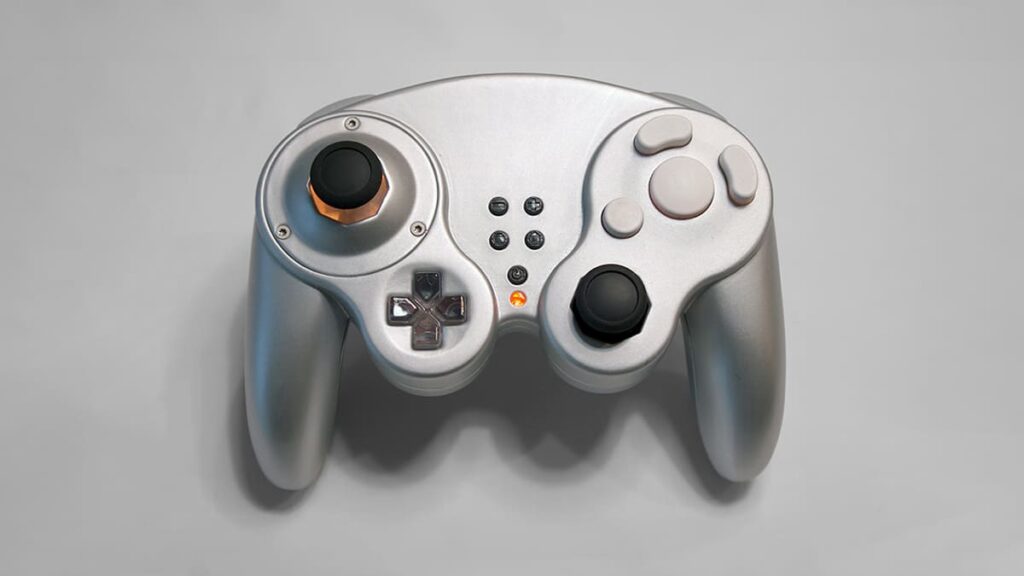
Gamecube controllers are one of the most important devices to the Super Smash Bros competitive scene. With it’s iconic design and timeless hardware very few things on the market come close to the quality it provides. But the availability of a good controller can be difficult to come by especially since the last controllers produced by Nintendo was over a decade ago. Handheld Legends is a company that specializes in gaming accessories and they decided to see if they could fix this problem by introducing the GC Ultimate. A modern controller with a retro design.
Handheld Legends is my sponsor and sent me this controller as a review product. This isn’t the first controller they have sent me either. Last year I reached out to them about the ProGCC, which was a controller I was very interested in. I wrote a review about it here if you want to check that out. The ProGCC solved a very unique problem that I had by allowing me to play every single Smash Brothers game on the same controller, and after I resolved some issues with their customer support I was very satisfied with the product I received. Thanks to this previous relationship with the company, I was able to get my hands on a review product of the GC Ultimate, a controller that aims to be the one stop shop for your gaming needs with the classic design that we all know and love.
I received the controller about six months ago and have had a lot of time to use it and think about it. Here’s the good, the bad, and unfortunately the ugly parts of the GC Ultimate.
The Good
There are a lot of cool features packed into this controller! To start, you have the option to choose between an ocatagon or a circle gate which is unheard of in controller schemes today. Three screws is all it takes to switch and the variety of colors they provide gives you a lot of customization options between the shell and the gate. The sticks use hall-effect sensors which gives it much better precision than you would find on an a OEM (Original Equipment Manufacturer) Gamecube model. As someone who plays a lot of Super Smash Bros Melee I swear by these sensors and love the amount of control I have while using them.
Setting up the controller is also very user friendly, even for someone who may be inexperienced with controller modding. To update the controller all you need to do is plug in a USB-C to your computer and connect it to the browser config menu, which is very simple to understand and use. In these menus you can do a variety of things such as modify your deadzones, change your shoulder button sensitivities, and even remap your controllers. Z-Button jump is becoming an increasingly popular option for games such as Melee and instead of soldering a new route on your motherboard, all it takes is a few clicks of the mouse. The ability to setup specific controller mapping for different controller settings is also very useful. By changing the button remapping for the N64 settings I can make it behave much closer to a modern controller while playing these older games. And the ability to change the RGB lighting to whatever you want is frankly, a lot of fun.

One upgrade over the ProGCC is the inclusion of a power button. It’s a basic thing but with my other controller to turn it off I had to hold down both sticks at the same time for a few seconds. Now it’s just one button and I find the quality of life with that to be surprisingly convenient. The mouse trigger Z-Buttons feel excellent to use, and having a left Z-Trigger lets you use a Gamecube controller for modern games. If you’ve ever tried to use an OEM Gamecube Controller on Steam, you’ll understand how awesome it is to be able to set your GC Ultimate to “XBox mode”. I love having the option to play Monster Hunter or Hollow Knight: Silksong on a Gamecube Controller.
The ability for it to connect to not only Steam, but even older hardware with individual cables is also really awesome and is the reason I reached out to the company in the first place over a year ago. Simply plug in a USB-C to Gamecube, or USB-C to N64, or even NES and you can play basically any game you want with this controller! I also love how easy it is to disassemble compared to a Pro Controller. The ProGCC uses Pro Controller hardware, which means there are several different screws holding it together, some of which don’t work with the screwdriver kit that I personally own. With only 6 screws holding the GC Ultimate together, just like an original Gamecube Controller, it’s very easy to access the internals. They also give you the option to customize your controller with plugged triggers, giving you digital inputs in place of analog. Personally my left shoulder button is now a digital press, which is great for wavedashing and L-Canceling and my right side is analog which allows me to do things such as light shield in Melee.
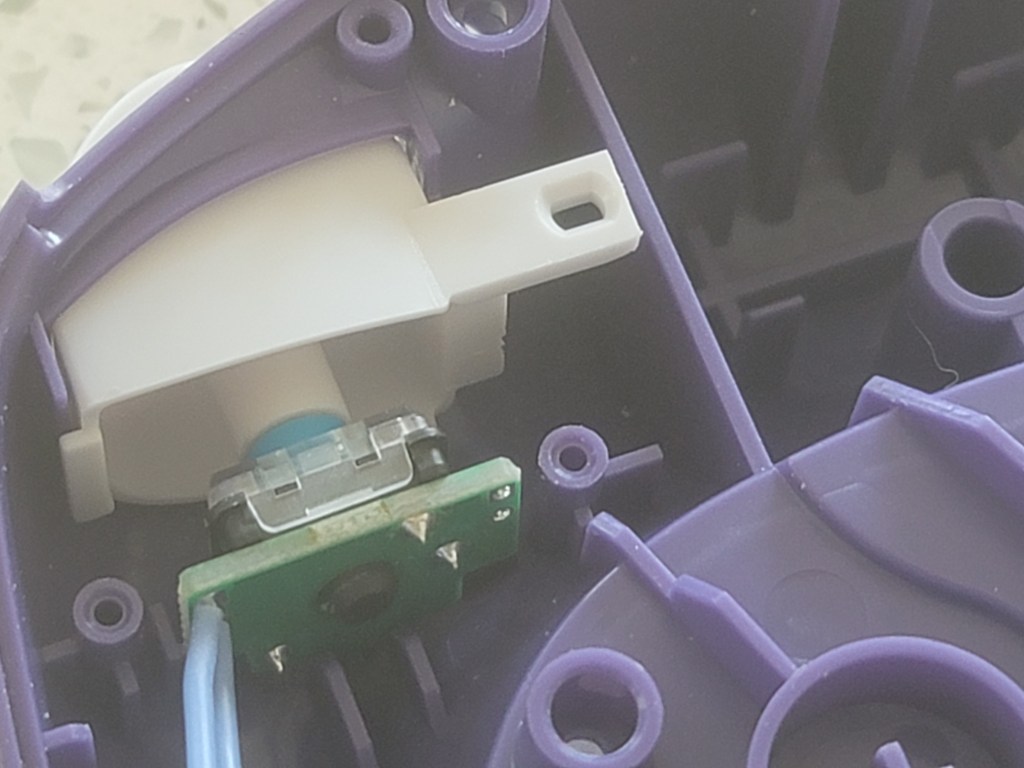
However, I did have some issues with the controller which I’ll get into in more detail later in the article. But one thing I want to mention is how great the customer service is for Handheld Legends. To be fair, I was given this controller for free as a review product and there is a possibility of favoritism being involved here. But whenever I’ve interacted with the company regarding any issues with my controllers, whether it be the ProGCC or the GC Ultimate, they have been fast to help me and have gone above and beyond to resolve my issues. In the past I’ve been sent brand new controllers when I’ve received what seems to be a faulty product, and with the GC Ultimate, I reported an issue and was given a brand new motherboard at no cost to resolve the issue. I’ve never seen a company with as great of customer support as Handheld Legends and if you buy a product from them I am confident they will do EVERYTHING in their power to make sure you are satisfied with their product.
Here’s a list of things that I think Handheld Legends did a great job with when it comes to the GC Ultimate.
- Top-Tier Customer Support
- Swappable gates for octagon or circle preference.
- Hall-effect sensors allow fine-tune control.
- Custom RGB lighting is fun!
- Config website is easy to use and provides lots of customization options.
- Simple button remapping that doesn’t require resoldering.
- Dedicated power button.
- Mouse-trigger Z button for left and right sides.
- Ability to work with Steam, Switch, XBox and retro hardware simply by swapping cables.
- Bluetooth capability.
- Easy disassembly.
- Option for pre-built or motherboard only purchase, potentially saving money for tech-savy consumers.
- Digital or analog options for shoulder buttons.
When I’m playing games on my controller it feels great, and I greatly prefer it over my OEM Gamecube Controller. The GC Ultimate is an ambitious design and is trying to do a lot, and to it’s credit I believe that they did succeed on making a retro controller for the modern era. But as much as I want to like this controller there are some serious issues with it that I need to address.
The Bad
The shoulder buttons provided with the controller were shaped in a way that I don’t like. They have less depth to them compared to OEM Gamecube controllers and your fingers don’t sit in them as deeply. I’ve been told that some people love the shape of the shoulder buttons but for me personally they weren’t a great fit. However, one of the selling points about this controller is the ability to use OEM materials with the controller which means I could use the original hardware if I preferred it. I installed the original Gamecube Controller shoulder buttons which I greatly prefer but I’m happy that this is an option for people who enjoy the new style of shoulder buttons.

But the advertised feature of being able to use OEM Gamecube parts only applies to certain aspects of the controller. While you can swap out the shoulder and face buttons with what you prefer, you are locked into using the sticks that they provide. This is something they have been transparent about since the beginning but I personally wanted to use the original yellow C-Stick and was unable to, because of the motherboard the controller uses. This aspect was disappointing to me, but I understand why the custom PCB may introduce some limitations. However, this aspect of the controller leads into some greater issues that I’ll go into more depth in the next section.
Disassembling this controller is a breeze compared to the ProGCC and modding it is pretty simple overall. But I hate putting this controller back together. Compared to an original Gamecube Controller, there are a lot more parts that you have to think about while snapping it back in place. It’s a significantly more complicated controller, which gives it a lot more features, but the cost of complexity is shown when the damn thing will have a half inch of space holding it apart and you don’t know why. I’ll admit that this could be a skill issue and I’m not the best at reassembling electronics, but I’ve gotten to the point where I don’t even want to include rumble as an option anymore because it was so much easier to leave them outside of the controller while I assembled everything else back together.
One of the first things I noticed while using this controller is that the parts they used for it feel very cheap, especially the sticks. I hate to say that because I expect a lot from Handheld Legends but I can’t deny that the controller just doesn’t feel as good as it should. The sticks it came with had the rubber wearing off extremely quickly. In less than two weeks I was already replacing it with the other sticks they provided. When I brought up this issue with the owner of the company he sent me brand new sticks and assured me it was a 1st run production issue, but within a couple of days the new sticks he provided (for free) were already showing serious wear and tear. Granted I do play Melee, one of the most demanding games for controllers of all-time, but I was very disappointed that the provided sticks wore down as quickly as they did.

However, since I was having issues with the provided sticks I thought I could swap them out with original hardware in the same way I was able to do with the shoulder buttons. But given the unique positioning of the motherboard you are forced to use the sticks that the company provides, and the truth is the sticks they provide aren’t very good. While the motherboard isn’t compatible with original Gamecube controller sticks, I did discover that it is compatible with Nintendo Switch Pro Controller sticks which I have swapped out and have had much less issues with. But it is disappointing that the poor quality of the provided sticks made my experience with the controller much less enjoyable.
- The provided shoulder buttons were not to my personal preference.
- I was able to install some original hardware pieces but not others.
- I couldn’t add the original C-Stick which was the look I wanted.
- No RGB lighting for the C-Stick or D-Pad. (Planned for future versions of the product).
- Reassembly can be very annoying, especially when trying to add in the rumble option.
- It’s packed with a lot of features which can make first-time use of the controller confusing. (Reading their guide is mandatory).
- The provided sticks wore off extremely quickly and if I wanted something more durable I have to use Nintendo Switch Pro Controller sticks instead.
The Ugly
I have a relationship with Handheld Legends now because I reached out to them last year so I could use their ProGCC for a challenge where I played as the same Smash Bros character in all five games. When dealing with consoles ranging from the N64 to the Nintendo Switch, being able to play all five games on a single controller was very appealing to me. I was sent the ProGCC for free, and while I had some issues with it at first their customer support smoothed things over and I ended up with a product I felt lucky to have. You can read more about my experience with the ProGCC here. So when I told them I was going to be doing the same challenge again this year to play as Captain Falcon in every Smash game (which you can watch here) I was excited to use the GC Ultimate for this same exact reason.

I received the controller a month before Supernova and the software was initially plagued with bugs. I knew it was a first of it’s kind product but I was surprised at how many issues there were, given that I didn’t experience this with the ProGCC. The biggest software issue I had was it becoming unresponsive mid-game because it would start rumbling and I could only fix it by unplugging it and plugging it back in. (This was eventually patched). However, a week before Supernova the controller stopped functioning in it’s entirety. I was forced to use my ProGCC for the tournament (which worked well enough) but I was severely disappointed that the GC Ultimate was non-functional for the event I planned on using it for. The specific issue which took a while to diagnose was that my controller stopped functioning with Gamecube cables, or any cables of that kind and was only responsive to USB-C to USB meaning it only functioned with my PC. This issue had to be resolved by sending me a brand new motherboard which I wasn’t able to get in time for the event. (They did send the motherboard to me for free, I cannot stress enough how awesome their customer support is).
Six months later and I’m still struggling with some software issues. While I haven’t had the controller become unresponsive mid-match in a while, it will frequently become unresponsive in menus forcing me to unplug and plug it back in. Or it will constantly hold upwards even if I’m not touching the controller. This worries me since if I do decide to bring this controller with me to a tournament I can’t trust that the controller won’t have issues during a match which could lead to consequences such as forfeiting a stock or game. The controller receives patches fairly frequently which can solve some bugs, but could also unintentionally introduce new ones. It feels unreliable to me which is not the kind of controller a competitor would want to have.
- The software can be buggy and I’ve had it become unresponsive mid-game making it unreliable for tournament play.
- It broke within a month of receiving it which meant I couldn’t use it for the tournament I was traveling across the country for.
- The hardware for my controller malfunctioned and I had to have new product sent to replace it. (But it was sent at no additional charge).
Final Results
I don’t want to end this article off on a negative note. When I’m actually playing games on my GC Ultimate I love my controller. The hall-effect sensors feel amazing to use and the simplicity behind the customizability is genius. The choice between an octagon or circle gate is really clever design and the browser based config menu is very user-friendly. The whole reason I reached out to Handheld Legends in the first place was because they are one of the only companies that offers a controller that can play on multiple decades worth of hardware simply by swapping a USB-C cable.
The GC Ultimate is a first of it’s kind product funded via Kickstarter and it’s very ambitious in what it’s trying to do. And for what it’s worth I feel like they did accomplish many of the goals they set out to do. But the flaws I’ve experienced regarding the controller leads me to believe that the GC Ultimate is still in a prototype phase. The lack of RGB lighting for the D-Pad and C-Stick, combined with the poor quality of the sticks, and at-times buggy software brought down my overall perception of the product.

That being said I still see a bright future for the GC Ultimate. Since that first month of release the controller has had quite a few patches and more software issues are being resolved as time goes on. Since I’ve installed my new motherboard I haven’t had any issues regarding the cables like I did in the past, and it is on their roadmap to create a new PCB that has RGB lighting for the entire controller. If they can find a solution to the sticks to make them more durable and tackle all the bugs I could see the next release of the GC Ultimate being excellent!
I believe that Handheld Legends is a company that is trying very hard to make a quality product and while I feel like they missed some marks on the GC Ultimate I think it has a strong foundation and can become even better than it currently is. If you buy product from this company Handheld Legends are committed to making sure you feel like it was worth it. The quality of their customer support leads me to believe that they care about the quality of their products. And I believe that they are committed to making the GC Ultimate the best controller it can be. It’s just unfortunate that the product isn’t quite there yet.

 Only On Tuesdays